Custom SRP 7.3
Raster Shadow Passes
This Unity tutorial is made with Unity 6000.5.8f1 and follows Custom SRP 7.2.
Drawing and Setting Data
We recently split the code for directional and other shadows, putting each in a separate class. Then we disentangled shadows from the lighting pass and gave them their own separate passes. Now we switch to raster render passes for drawing shadows, taking advantage of the modern attachment management of Unity's render graph.
Unfortunately there is a snag: there is currently no RasterCommandBuffer.SetBufferData method. It will become available in the future, but until then we still have to rely on UnsafeCommandBuffer.SetBufferData. To make it possible to switch to raster passes now we'll split the work into separate raster and unsafe passes. When RasterCommandBuffer.SetBufferData is available in a supported future Unity version we can get rid of these unsafe passes.
We start with DirectionalShadows. We're going to split the drawing code from the code that is responsible for managing resource handles and setting global GPU data. The first step of this is to isolate the atlas texture management part of GetHandles, putting it in a separate GetAtlasHandle method. To keep the original method functional we add a parameter for the atlas handle to it.
	public TextureHandle GetAtlasHandle(
		RenderGraph renderGraph, IUnsafeRenderGraphBuilder builder)
	{
		TextureHandle atlas;
		if (lightCount > 0)
		{
			int atlasSize = (int)settings.atlasSize;
			atlas = renderGraph.CreateTexture(new TextureDesc(…);
			builder.UseTexture(atlas, AccessFlags.WriteAll);
			return atlas;
		}
		else
		{
			atlas = renderGraph.defaultResources.defaultShadowTexture;
		}
		return atlas;
	}

	public Handles GetHandles(
		RenderGraph renderGraph,
		IUnsafeRenderGraphBuilder builder,
		TextureHandle atlas)
	{
		handles = new Handles(
			atlas,
			renderGraph.CreateBuffer(…));
		builder.UseBuffer(handles.cascadeBuffer, AccessFlags.WriteAll);
		builder.UseBuffer(handles.matrixBuffer, AccessFlags.WriteAll);
		return handles;
	}
The second step is to also split the public RenderDirectionalShadows method. The rendering part stays in the original method while setting all the global data is moved to a new SetGlobalData method. We also remove the old sample methods.
	public void RenderDirectionalShadows(UnsafeCommandBuffer buffer)
	{
		//buffer.BeginSample("Directional Shadows");
		if (lightCount > 0)
		{
			buffer.SetRenderTarget(
				handles.atlas,
				RenderBufferLoadAction.DontCare, RenderBufferStoreAction.Store);
			buffer.ClearRenderTarget(true, false, Color.clear);
			buffer.SetGlobalFloat(shadowPancakingId, 1f);

			for (int i = 0; i < lightCount; i++)
			{
				RenderDirectionalShadows(i, buffer);
			}
			buffer.SetGlobalFloat(shadowPancakingId, 0f);
		}
	}

	public void SetGlobalData(UnsafeCommandBuffer buffer)
	{
		buffer.SetGlobalDepthBias(0f, 0f);
		buffer.SetGlobalBuffer(cascadesId, handles.cascadeBuffer);
		buffer.SetGlobalBuffer(matricesId, handles.matrixBuffer);
		buffer.SetGlobalTexture(atlasId, handles.atlas);
		buffer.SetGlobalInt(cascadeCountId,
			lightCount > 0 ? settings.cascadeCount : 0);
		buffer.SetBufferData(
			handles.cascadeBuffer, cascades, 0, 0, settings.cascadeCount);
		buffer.SetBufferData(
			handles.matrixBuffer, matrices,
			0, 0, lightCount * settings.cascadeCount);
		buffer.SetKeyword(
			softCascadeBlendKeyword, settings.softCascadeBlend);
		//buffer.EndSample("Directional Shadows");
	}
The third step is to adapt DirectionalShadowsPass to work with the split functionality. Render now has to invoke two methods.
	void Render(UnsafeGraphContext context)
	{
		shadows.RenderDirectionalShadows(context.cmd);
		shadows.SetGlobalData(context.cmd);
	}
And Record as well. We get the atlas handle before passing it to GetHandles later.
		TextureHandle atlas = pass.shadows.GetAtlasHandle(renderGraph, builder);
		return pass.shadows.GetHandles(renderGraph, builder, atlas);
Splitting the Pass
Now that the code has been partitioned we move on to splitting the pass into one for drawing and another for setting data. Replace the single ProfilingSampler with two to match.
static readonly ProfilingSampler//sampler = new("Directional Shadows");drawSampler = new("Directional Shadows Drawing"), dataSampler = new("Directional Shadows Data");
Adjust Record so it uses two separate builders for two instances of the pass, the first for drawing and the second for setting global data. Instead of relying on the Render method we set the render function to directly invoke the appropriate method for each pass. I also switched to using var to declare the builder variables, matching Unity's own convention, and to keep the code lines shorter.
		TextureHandle atlas;
		using (var builder = renderGraph.AddUnsafePass(
			drawSampler.name, out DirectionalShadowsPass pass, drawSampler))
		{
			pass.shadows = shadows.directionalShadows;

			builder.SetRenderFunc<DirectionalShadowsPass>(
				static (pass, context) =>
					pass.shadows.RenderDirectionalShadows(context.cmd));

			if (pass.shadows.HasLights)
			{
				pass.shadows.BuildRendererLists(
					renderGraph, builder, cullingResults, cullingInfos);
			}
			//TextureHandle
			atlas = pass.shadows.GetAtlasHandle(renderGraph, builder);
		}

		using (var builder = renderGraph.AddUnsafePass(
			dataSampler.name, out DirectionalShadowsPass pass, dataSampler))
		{
			pass.shadows = shadows.directionalShadows;

			builder.SetRenderFunc<DirectionalShadowsPass>(
				static (pass, context) =>
					pass.shadows.SetGlobalData(context.cmd));

			return pass.shadows.GetHandles(renderGraph, builder, atlas);
		}
The single Render method is no longer needed.
//void Render(UnsafeGraphContext context) { … }
The only extra step required to make these split passes work is to indicate that the atlas is used in the data pass, in DirectionalShadows.GetHandles.
		builder.UseTexture(atlas);
		builder.UseBuffer(handles.cascadeBuffer, AccessFlags.WriteAll);
		builder.UseBuffer(handles.matrixBuffer, AccessFlags.WriteAll);
Raster Render Pass
With the passes split we can turn the drawing pass into a raster render pass in DirectionalShadowsPass.Record. We must allow global state modification of this pass otherwise adjusting the global shadow pancaking shader property will fail.
		using (var builder = renderGraph.AddRasterRenderPass(
			drawSampler.name, out DirectionalShadowsPass pass, drawSampler))
		{
			pass.shadows = shadows.directionalShadows;

			builder.AllowGlobalStateModification(true);
			builder.SetRenderFunc(
				static (pass, context) =>
					pass.shadows.RenderDirectionalShadows(context.cmd));
			…
		}
Moving to DirectionalShadows, we need to change the BuildRendererLists methods so they accept a IRasterRenderGraphBuilder.
	public void BuildRendererLists(
		RenderGraph renderGraph,
		IRasterRenderGraphBuilder builder,
		CullingResults cullingResults,
		ShadowCastersCullingInfos cullingInfos) { … }

	void BuildRendererLists(
		int index,
		RenderGraph renderGraph,
		IRasterRenderGraphBuilder builder,
		CullingResults cullingResults,
		ShadowCastersCullingInfos cullingInfos) { … }
GetAtlasHandle must also switch its builder type. To switch to the new way of managing render attachments we have to make a few more adjustments as well:
First, we indicate that the buffer has to be cleared via the TextureDesc.clearBuffer field.
Second, we replace UseTexture with SetRenderAttachmentDepth with access flags for writing. It is important to use AccessFlags.Write instead of AccessFlags.WriteAll. The first option in combination with indicating that we need a clear buffer instructs Unity to clear the texture before we render to it, using the most efficient hardware path. The second option would indicate that we fully overwrite the attachment's contents, so Unity would skip clearing it, which is not what we want.
Third and finally, we can immediately take care of setting the texture globally in the raster render pass via SetGlobalTextureAfterPass, like we do for the copy passes.
	public TextureHandle GetAtlasHandle(
		RenderGraph renderGraph,
		IRasterRenderGraphBuilder builder)
	{
		TextureHandle atlas;
		if (lightCount > 0)
		{
			int atlasSize = (int)settings.atlasSize;
			atlas = renderGraph.CreateTexture(new TextureDesc(
				atlasSize, atlasSize)
			{
				depthBufferBits = DepthBits.Depth32,
				isShadowMap = true,
				clearBuffer = true,
				name = "Directional Shadow Atlas"
			});
			//builder.UseTexture(atlas, AccessFlags.WriteAll);
			builder.SetRenderAttachmentDepth(atlas, AccessFlags.Write);
		}
		else
		{
			atlas = renderGraph.defaultResources.defaultShadowTexture;
		}
		builder.SetGlobalTextureAfterPass(atlas, atlasId);
		return atlas;
	}
Next up, switch the RenderDirectionalShadows methods to using a RasterCommandBuffer. We no longer sets the render target here nor clear it.
	public void RenderDirectionalShadows(RasterCommandBuffer buffer)
	{
		if (lightCount > 0)
		{
			//buffer.SetRenderTarget(…);
			//buffer.ClearRenderTarget(true, false, Color.clear);
			buffer.SetGlobalFloat(shadowPancakingId, 1f);

			for (int i = 0; i < lightCount; i++)
			{
				RenderDirectionalShadows(i, buffer);
			}
			buffer.SetGlobalFloat(shadowPancakingId, 0f);
		}
	}

	…

	void RenderDirectionalShadows(int index, RasterCommandBuffer buffer) { … }
SetGlobalData still uses an UnsafeCommandBuffer, but it no longer has to set the atlas texture globally because the draw pass takes care of that automatically.
	public void SetGlobalData(UnsafeCommandBuffer buffer)
	{
		buffer.SetGlobalDepthBias(0f, 0f);
		buffer.SetGlobalBuffer(cascadesId, handles.cascadeBuffer);
		buffer.SetGlobalBuffer(matricesId, handles.matrixBuffer);
		//buffer.SetGlobalTexture(atlasId, handles.atlas);
		buffer.SetGlobalInt(cascadeCountId,
			lightCount > 0 ? settings.cascadeCount : 0);
		buffer.SetBufferData(
			handles.cascadeBuffer, cascades, 0, 0, settings.cascadeCount);
		buffer.SetBufferData(
			handles.matrixBuffer, matrices,
			0, 0, lightCount * settings.cascadeCount);
		buffer.SetKeyword(
			softCascadeBlendKeyword, settings.softCascadeBlend);
	}
So we no longer need to indicate that we use the atlas in GetHandles.
//builder.UseTexture(atlas);
The final adjustment is adding a Shadows.SetTileViewport method that works with a RasterCommandBuffer. For the moment we still need the old method for other shadows.
	public static Vector2 SetTileViewport(
		UnsafeCommandBuffer buffer, int index, int split, float tileSize) { … }

	public static Vector2 SetTileViewport(
		RasterCommandBuffer buffer, int index, int split, float tileSize) { … }
Other Shadows
Once we've verified that directional shadows work with the new approach we can move on to making the same changes to OtherShadowsPass. The only difference is the shadows type and that no global state modification is required.
static readonly ProfilingSampler//sampler = new("Other Shadows");drawSampler = new("Other Shadows Drawing"), dataSampler = new("Other Shadows Data"); OtherShadows shadows;void Render(UnsafeGraphContext context) =>shadows.RenderOtherShadows(context.cmd);public static OtherShadows.Handles Record( RenderGraph renderGraph, CullingResults cullingResults, ShadowCastersCullingInfos cullingInfos, Shadows shadows) { TextureHandle atlas; using (var builder = renderGraph.AddRasterRenderPass( drawSampler.name, out OtherShadowsPass pass, drawSampler)) { pass.shadows = shadows.otherShadows; builder.SetRenderFunc<OtherShadowsPass>( static (pass, context) => pass.shadows.RenderOtherShadows(context.cmd)); if (pass.shadows.HasLights) { pass.shadows.BuildRendererLists( renderGraph, builder, cullingResults, cullingInfos); } atlas = pass.shadows.GetAtlasHandle(renderGraph, builder); } using (var builder = renderGraph.AddUnsafePass( dataSampler.name, out OtherShadowsPass pass, dataSampler)) { pass.shadows = shadows.otherShadows; builder.SetRenderFunc<OtherShadowsPass>( static (pass, context) => pass.shadows.SetGlobalData(context.cmd)); return pass.shadows.GetHandles(renderGraph, builder, atlas); } }
Adapt OtherShadows in the same way.
	public TextureHandle GetAtlasHandle(
		RenderGraph renderGraph, IRasterRenderGraphBuilder builder)
	{
		TextureHandle atlas;
		if (lightCount > 0)
		{
			int atlasSize = (int)settings.atlasSize;
			atlas = renderGraph.CreateTexture(new TextureDesc(
				atlasSize, atlasSize)
			{
				depthBufferBits = DepthBits.Depth32,
				isShadowMap = true,
				clearBuffer = true,
				name = "Other Shadow Atlas"
			});
			//builder.UseTexture(atlas, AccessFlags.WriteAll);
			builder.SetRenderAttachmentDepth(atlas, AccessFlags.Write);
		}
		else
		{
			atlas = renderGraph.defaultResources.defaultShadowTexture;
		}
		builder.SetGlobalTextureAfterPass(atlas, atlasId);
		return atlas;
	}

	public Handles GetHandles(
		RenderGraph renderGraph,
		IUnsafeRenderGraphBuilder builder,
		TextureHandle atlas)
	{
		handles = new Handles(…);
		builder.UseBuffer(handles.buffer, AccessFlags.WriteAll);
		return handles;
	}

	public void BuildRendererLists(
		RenderGraph renderGraph,
		IRasterRenderGraphBuilder builder,
		CullingResults cullingResults,
		ShadowCastersCullingInfos cullingInfos) { … }

	void BuildSpotShadowsRendererList(
		int index,
		RenderGraph renderGraph,
		IRasterRenderGraphBuilder builder,
		CullingResults cullingResults,
		ShadowCastersCullingInfos cullingInfos) { … }

	void BuildPointShadowsRendererList(
		int index, RenderGraph renderGraph,
		IRasterRenderGraphBuilder builder,
		CullingResults cullingResults,
		ShadowCastersCullingInfos cullingInfos) { … }

	public void RenderOtherShadows(RasterCommandBuffer buffer) {
		//buffer.BeginSample("Other Shadows");
		if (lightCount > 0)
		{
			//buffer.SetRenderTarget(…);
			//buffer.ClearRenderTarget(true, false, Color.clear);
			…
		}
	}

	public void SetGlobalData(UnsafeCommandBuffer buffer)
	{
		buffer.SetGlobalDepthBias(0f, 0f);
		//buffer.SetGlobalTexture(atlasId, handles.atlas);
		buffer.SetGlobalBuffer(dataId, handles.buffer);
		buffer.SetBufferData(handles.buffer, data, 0, 0, lightCount);
		//buffer.EndSample("Other Shadows");
	}

	void RenderSpotShadows(
		int index, RasterCommandBuffer buffer, float border) { … }

	void RenderPointShadows(
		int index, RasterCommandBuffer buffer, float border) { … }
Finally, remove the Shadows.SetTileViewport method that is no longer needed.
//public static Vector2 SetTileViewport(//UnsafeCommandBuffer buffer, int index, int split, float tileSize) { … }
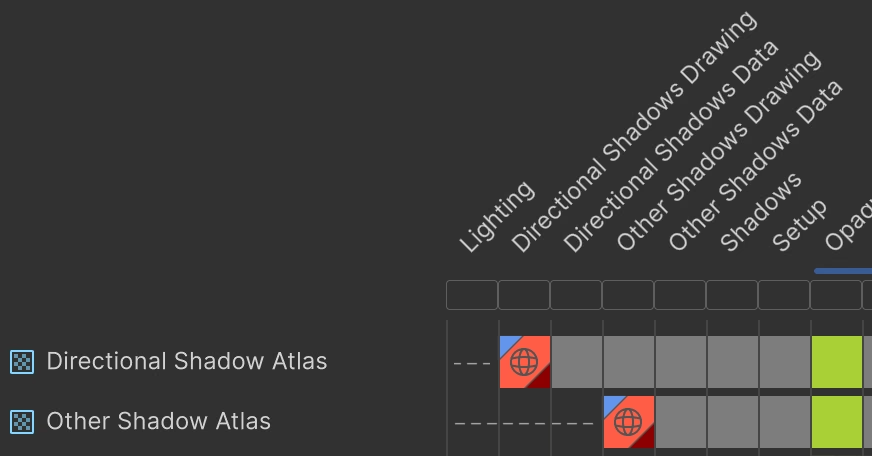
All shadows are now rendered using raster render passes, which is the goal that we wanted to achieve. The render graph viewer will show that these passes write to their atlas texture, with a load action of clear, a store action of store, and that they update global resources. Because we had to keep unsafe passes for setting buffer data we ended up with a total of five passes dedicated to shadows. We'll consolidate these in the future, when able.