
Hex Map 5.3.0
Storing the Found Path
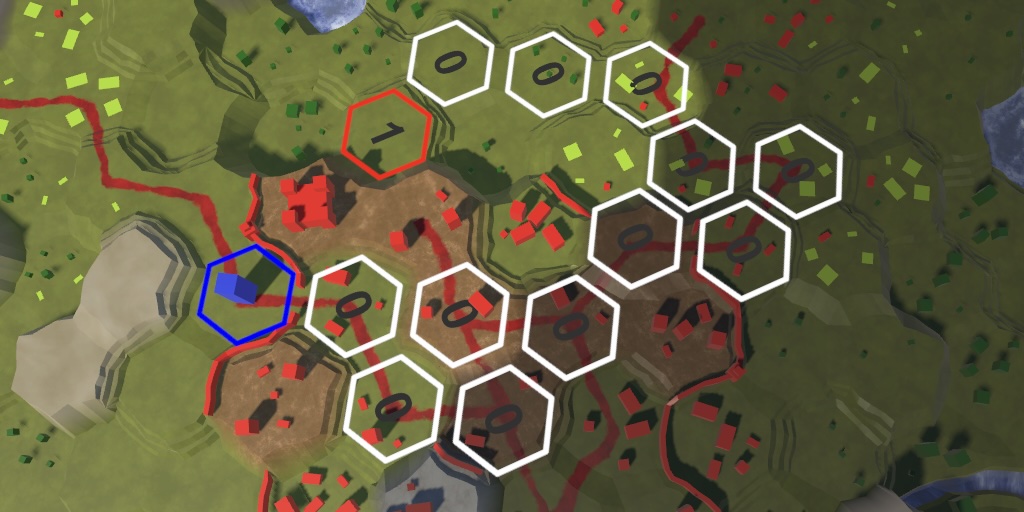
This tutorial is made with Unity 6000.3.17f1 and follows Hex Map 5.2.0.
Pathfinding When Needed
This time we only make a small change to our project. We tweak pathfinding a bit, in preparation for future improvements.
Up to this points we've always initiated a new search whenever the cursor hovers over a valid destination cell. This happens each update, even when the destination cell doesn't change. Although this is the most robust approach, it is not needed if the map state doesn't change while in play mode without the player's direct input. So let's limit pathfinding to only trigger when a different destination cell becomes available. We can do this by making HexGameUI.UpdateCurrentCell only return true both when it detects a cell and if that cell is not already the current cell.
	bool UpdateCurrentCell()
	{
		HexCell cell = grid.GetCell(
			Camera.main.ScreenPointToRay(positionAction.ReadValue<Vector2>()));
		if (cell && cell != currentCell)
		{
			currentCell = cell;
			return true;
		}
		return false;
	}
This avoids a lot of unnecessary work when the cursor is stationary while the game is in pathfinding mode for a selected unit.
Storing the Current Path Separately
During pathfinding we use HexCellSearchData.pathFrom to keep track of from where we reached a cell. When a move command is issued we find the unit's path by traversing these path-from links backwards and fill a list with the cell indices, which we reverse at the end to get a path in the correct direction.
The current approach works and only builds the final list when needed, but a downside of this delayed approach is that the current search data contains vital path information that needs to be kept intact. Because we reuse the same search data for all searches the current path data must be maintained while other searches might happen in the mean time. Specifically, searches for visible cells can happen at any time while units are moving.
Ideally each search is isolated and cannot corrupt the data of a previous search. This will also make it possible to be more flexible with the search data, so we could for example have multiple instances of it and perform multiple searches simultaneously.
To avoid relying on old search data we will change approach and immediately put the path in a list when it is found. Then when it is retrieved we will provide a copy of this list. Copying the list isn't strictly necessary, but makes managing things easier. Copying will only be done when a move command is issued and we could optimize this in the future later if needed.
Current Path
Replace the bool currentPathList field of HexGrid with a List<int> currentPath field.
//bool currentPathExists;List<int> currentPath;
Its HasPath property now has to check whether that list exists instead of simply returning the old field.
public bool HasPath => currentPath != null;
GetPath no longer needs to walk through the search data to generate the path list, it will instead get a list from the pool and call AddRange on it, passing along the current path to it.
	public List<int> GetPath()
	{
		//if (!currentPathExists) { … }
		List<int> path = ListPool<int>.Get();
		//for (…) { … }
		//path.Add(currentPathFromIndex);
		//path.Reverse();
		path.AddRange(currentPath);
		return path;
	}
And ClearPath can directly loop through and then release the list instead of having the rely on the search data.
	public void ClearPath()
	{
		if (currentPath != null)
		{
			//int currentIndex = currentPathToIndex;
			//while (currentIndex != currentPathFromIndex)
			foreach (int i in currentPath)
			{
				SetLabel(i, null);
				DisableHighlight(i);
				//currentIndex = searchData[currentIndex].pathFrom;
			}
			//DisableHighlight(currentIndex);
			//currentPathExists = false;
			ListPool<int>.Add(currentPath);
			currentPath = null;
		}
		else if (currentPathFromIndex >= 0)
		{
			DisableHighlight(currentPathFromIndex);
			DisableHighlight(currentPathToIndex);
		}
		currentPathFromIndex = currentPathToIndex = -1;
	}
In FindPath we now have to immediately create the current path list. We also show the path here visually, which requires traversing the path as well. Let's do both at the same, so we can get rid of the separate ShowPath method. Move the code from that method into Findpath and combine it with building the path list.
//void ShowPath(int speed) { … }public void FindPath(HexCell fromCell, HexCell toCell, HexUnit unit) { ClearPath(); currentPathFromIndex = fromCell.Index; currentPathToIndex = toCell.Index;//currentPathExists = Search(fromCell, toCell, unit);//ShowPath(unit.Speed);if (Search(fromCell, toCell, unit)) { int speed = unit.Speed; currentPath = ListPool<int>.Get(); for (int i = currentPathToIndex; i != currentPathFromIndex; i = searchData[i].pathFrom) { int distance = searchData[i].distance; currentPath.Add(i); int turn = (distance - 1) / speed; SetLabel(i, turn.ToString()); EnableHighlight(i, Color.white); } currentPath.Add(currentPathFromIndex); currentPath.Reverse(); } EnableHighlight(currentPathFromIndex, Color.blue); EnableHighlight(currentPathToIndex, Color.red); }
Forgetting Old Search Data
Now that we immediately create a path list after a search we no longer need to keep the old search data intact. We used to copy the old pathFrom data in GetVisibleCells, but this is no longer needed. Omitting it from the new search data struct value effectively clears it.
	List<HexCell> GetVisibleCells(HexCell fromCell, int range)
	{
		…
		searchData[fromCell.Index] = new HexCellSearchData
		{
			searchPhase = searchFrontierPhase//,
			//pathFrom = searchData[fromCell.Index].pathFrom
		};
		searchFrontier.Enqueue(fromCell.Index);
		HexCoordinates fromCoordinates = fromCell.Coordinates;
		while (searchFrontier.TryDequeue(out int currentIndex))
		{
			…
			for (HexDirection d = HexDirection.NE; d <= HexDirection.NW; d++)
			{
				…
				if (currentData.searchPhase < searchFrontierPhase)
				{
					searchData[neighbor.Index] = new HexCellSearchData
					{
						searchPhase = searchFrontierPhase,
						distance = distance//,
						//pathFrom = currentData.pathFrom
					};
					searchFrontier.Enqueue(neighbor.Index);
				}
				…
			}
		}
		return visibleCells;
	}
These small changes will make things easier for us in the future. The next tutorial is Hex Map 5.4.0.