
Hex Map 5.4.0
New Map Generator
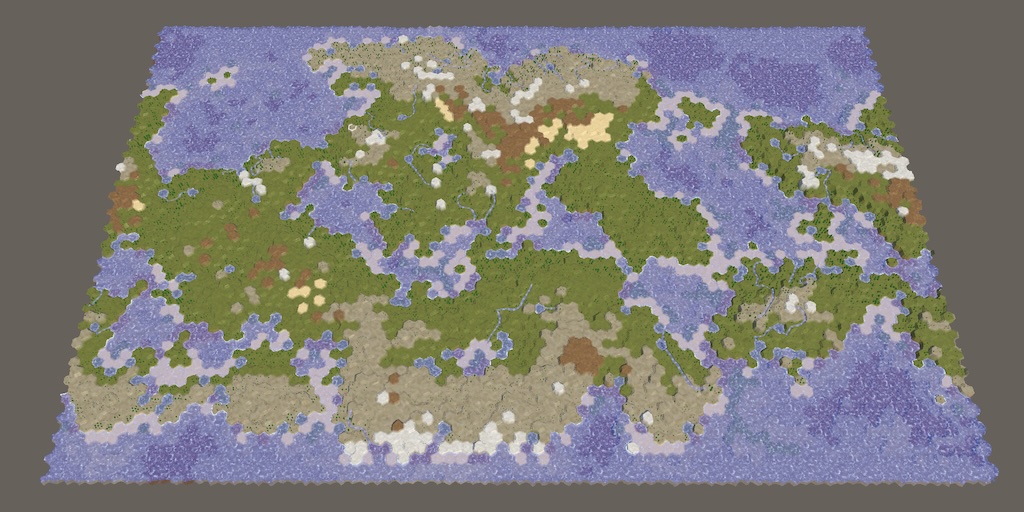
This tutorial is made with Unity 6000.3.20f1 and follows Hex Map 5.3.0.
Revisiting Map Generation
This time we're going to take a look at the map generation code of our project. Our ultimate goal is to modernize this code, replacing it with a sequence of Burst jobs. We won't immediately make the transition to real Burst jobs, because that will require more code changes elsewhere, but we will prepare for the transition by creating mock jobs.
To make sure that everything keeps working as it should the old and new code must generate the exact same maps. However, the current code doesn't produce consistent results itself. For example, I generate a large wrapping map with default settings, except with the seepage factor increased to 0.25, using fixed seed 1208905299. Doing this in the editor gets me a map with a tundra section in the north with multiple short rivers. Trying this in a build using Mono produces the same map.
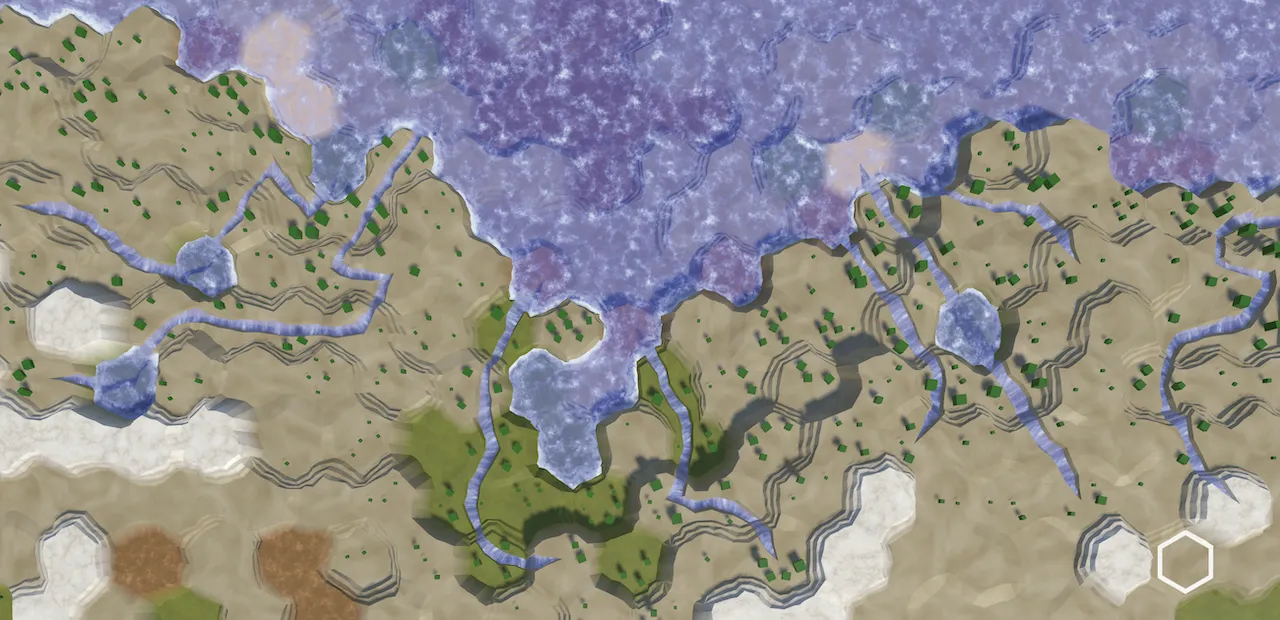
But an IL2CPP build generates different rivers with the exact same settings.
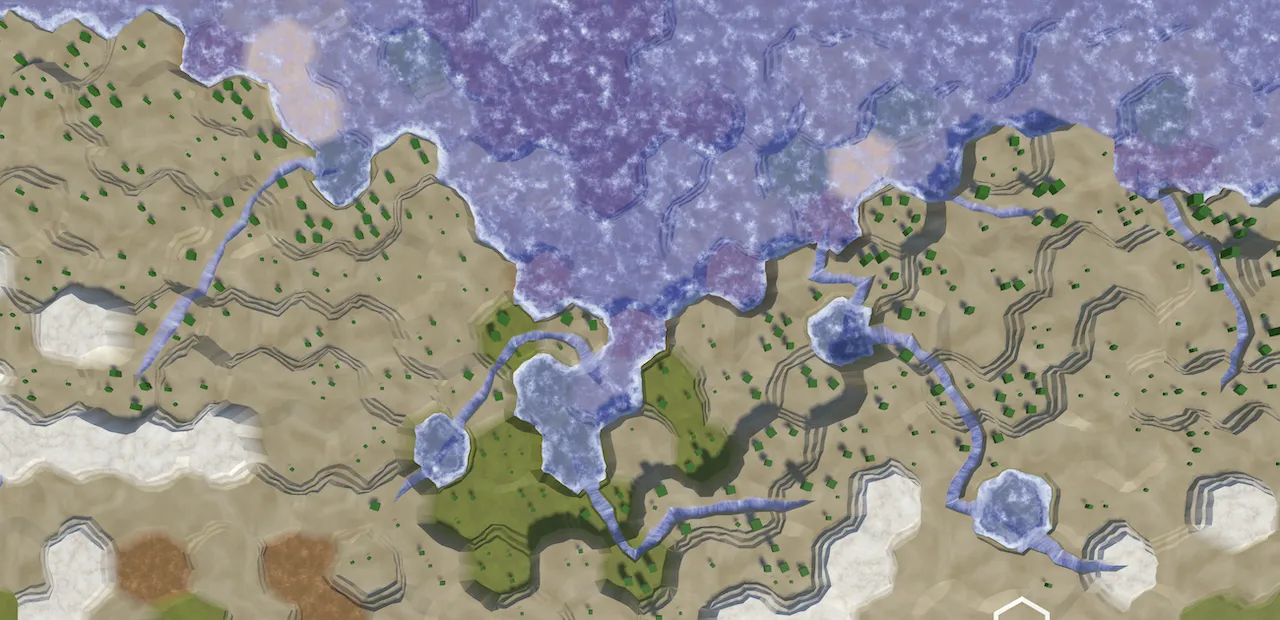
This happens because IL2CPP and Mono use different math. Mono is weird in that it converts float values to double when it performs a math operation and then converts back to float. Besides making things slower than necessary it also produces slightly different results. Even a tiny difference can be enough to change a threshold check somewhere, leading the generator down a completely different path.
IL2CPP builds don't act weird like Mono and neither do Burst jobs. So if we were to pick a baseline for comparison it makes most sense to use the IL2CPP version, also considering Unity's future migration away from Mono to CoreCLR. But if you're working with Mono or comparing results in the editor then you'll have to deal with the inconsistency.
Separate Settings Class
To easily compare results we're not going to immediately replace the existing map generator. We'll instead add an experimental generator that uses the same settings.
First, create a Scripts/Map Generator folder and put the existing HexMapGenerator script asset in it. Then to allow the sharing of settings create a serializable MapGeneratorSettings class there and copy all settings fields from the generator to it. I kept all defaults the same, except for the seepage factor which I increased to 0.25.
using UnityEngine;

[System.Serializable]
public class MapGeneratorSettings
{
	public bool useFixedSeed;

	public int seed;

	[Range(0f, 0.5f)]
	public float jitterProbability = 0.25f;

	[Range(20, 200)]
	public int chunkSizeMin = 30;

	[Range(20, 200)]
	public int chunkSizeMax = 100;

	[Range(0f, 1f)]
	public float highRiseProbability = 0.25f;

	[Range(0f, 0.4f)]
	public float sinkProbability = 0.2f;

	[Range(5, 95)]
	public int landPercentage = 50;

	[Range(1, 5)]
	public int waterLevel = 3;

	[Range(-4, 0)]
	public int elevationMinimum = -2;

	[Range(6, 10)]
	public int elevationMaximum = 8;

	[Range(0, 10)]
	public int mapBorderX = 5;

	[Range(0, 10)]
	public int mapBorderZ = 5;

	[Range(0, 10)]
	public int regionBorder = 5;

	[Range(1, 4)]
	public int regionCount = 1;

	[Range(0, 100)]
	public int erosionPercentage = 50;

	[Range(0f, 1f)]
	public float startingMoisture = 0.1f;

	[Range(0f, 1f)]
	public float evaporationFactor = 0.5f;

	[Range(0f, 1f)]
	public float precipitationFactor = 0.25f;

	[Range(0f, 1f)]
	public float runoffFactor = 0.25f;

	[Range(0f, 1f)]
	public float seepageFactor = 0.25f;

	public HexDirection windDirection = HexDirection.NW;

	[Range(1f, 10f)]
	public float windStrength = 4f;

	[Range(0, 20)]
	public int riverPercentage = 10;

	[Range(0f, 1f)]
	public float extraLakeProbability = 0.25f;

	[Range(0f, 1f)]
	public float lowTemperature = 0f;

	[Range(0f, 1f)]
	public float highTemperature = 1f;

	public enum HemisphereMode
	{
		Both, North, South
	}

	public HemisphereMode hemisphere;

	[Range(0f, 1f)]
	public float temperatureJitter = 0.1f;
}
Remove these fields and the HemisphereMode enum type from HexMapGenerator, replacing them with a single settings field using the new class.
[SerializeField]//…MapGeneratorSettings settings; HexCellPriorityQueue searchFrontier;
Now we have to prepend settings. to all references to the setting fields and use the MapGeneratorSettings.HemisphereMode enum type, and then everything will works the same as before. We do have to set the fixed seed 1208905299 again.
Experimental Map Generator
To introduce the new generator duplicate HexMapGenerator and change its class name to ExperimentalMapGenerator. This is a simple non-serializable class, so it does not extend MonoBehaviour. Everything else remains the same for now.
using System.Collections.Generic;
using UnityEngine;

public class ExperimentalMapGenerator { … }
Add a field for the experimental generator to HexMapGenerator.
	MapGeneratorSettings settings;

	ExperimentalMapGenerator experimentalMapGenerator;
Then add an experimental toggle parameter to GenerateMap. If it is enabled then we divert the map generation to the experimental code. Create the experimental map generator object if needed, setting its grid and settings fields. Then invoke its GenerateMap method and return.
	public void GenerateMap(int x, int z, bool wrapping, bool experimental)
	{
		if (experimental)
		{
			experimentalMapGenerator ??= new()
			{
				grid = grid,
				settings = settings
			};
			experimentalMapGenerator.GenerateMap(x, z, wrapping);
			return;
		}

		…
	}
Add an experimental toggle to NewMapMenu as its first option, enabled by default.
	bool experimental = true;

	bool generateMaps = true;

	bool wrapping = true;

	public void Open()
	{
		gameObject.SetActive(true);
		HexMapCamera.Locked = true;

		VisualElement root = GetComponent<UIDocument>().rootVisualElement;

		var experimentalToggle = root.Q<Toggle>("Experimental");
		experimentalToggle.value = experimental;
		experimentalToggle.RegisterValueChangedCallback(
			change => experimental = change.newValue);

		…
	}
Pass it to GenerateMap.
	void CreateMap(int x, int z)
	{
		if (generateMaps)
		{
			mapGenerator.GenerateMap(x, z, wrapping, experimental);
		}
		else
		{
			hexGrid.CreateMap(x, z, wrapping);
		}
		HexMapCamera.ValidatePosition();
		Close();
	}
And add the toggle to New Map Panel.uxml.
			<ui:Label text="Create New Map" style="align-self: center;"/>
			<ui:Toggle
				label="Experimental" name="Experimental" style="align-self: center;"/>
			<ui:Toggle
				label="Generate" name="Generate" style="align-self: center;"/>
			<ui:Toggle
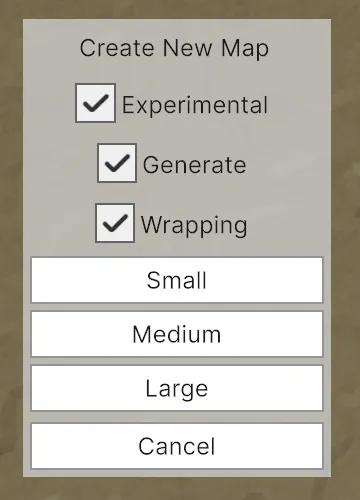
Now we can choose which generator to use when creating a new map. Currently both options end up executing identical code, just using different classes. With this set up we proceed to splitting the code of the experimental generator into multiple mock jobs. We will do this from end to front, peeling off portions of the code and checking whether we still get the same results along the way.
Set Terrain Type Job
The last phase of the map generation is setting the terrain type of the cells, so that's what we'll start with. We need to use the climate data for that, so make ExperimentalMapGenerator.ClimateData public.
	public struct ClimateData {
		public float clouds, moisture;
	}
Then introduce a new SetTerrainTypeJob struct type that contains all the biome data that we need, along with fields for the grid, settings, and cell climate list. Also add fields for the temperature jitter channel and the rock desert elevation.
using System.Collections.Generic;
using UnityEngine;

public struct SetTerrainTypeJob
{
	static readonly float[] temperatureBands = { 0.1f, 0.3f, 0.6f };
	static readonly float[] moistureBands = { 0.12f, 0.28f, 0.85f };

	struct Biome
	{
		public int terrain, plant;

		public Biome(int terrain, int plant)
		{
			this.terrain = terrain;
			this.plant = plant;
		}
	}

	static readonly Biome[] biomes = {
		new(0, 0), new(4, 0), new(4, 0), new(4, 0),
		new(0, 0), new(2, 0), new(2, 1), new(2, 2),
		new(0, 0), new(1, 0), new(1, 1), new(1, 2),
		new(0, 0), new(1, 1), new(1, 2), new(1, 3)
	};

	HexGrid grid;

	MapGeneratorSettings settings;

	List<ExperimentalMapGenerator.ClimateData> climate;

	int temperatureJitterChannel;

	int rockDesertElevation;
}
We run our mock job via a static Execute method, which needs parameters for the grid, settings, climate list, and also the cell count. It creates a job struct value as if for a Burst job. We immediately set the temperature jitter channel and rock desert elevation here. Then we run the job, which can act as an IJobFor that processes cells in parallel. For now this means we loop through all cells, invoking an Execute method on the job with a cell index.
	public static void Execute(
		HexGrid grid,
		MapGeneratorSettings settings,
		List<ExperimentalMapGenerator.ClimateData> climate,
		int cellCount)
	{
		var job = new SetTerrainTypeJob()
		{
			grid = grid,
			settings = settings,
			climate = climate,
			temperatureJitterChannel = Random.Range€(0, 4),
			rockDesertElevation = settings.elevationMaximum -
				(settings.elevationMaximum - settings.waterLevel) / 2
		};

		for (int i = 0; i < cellCount; i++)
		{
			job.Execute(i);
		}
	}
That execute method does the work currently done by the loop in the original SetTerrainType method. Because that method is rather large we'll break it up by putting the code paths for land values and underwater values in separate methods. These methods will return adjusted HexValues that we store here.
	void Execute(int index)
	{
		HexCellData cell = grid.CellData[index];
		float temperature = DetermineTemperature(index, cell);
		grid.CellData[index].values = !cell.IsUnderwater ?
			GetLandValues(cell, temperature, climate[index].moisture) :
			GetUnderwaterValues(cell, temperature);
	}
Copy the required DetermineTemperature method into the job, along with the code for land and underwater values, each in their own method that returns the adjusted HexValues.
	float DetermineTemperature(int cellIndex, HexCellData cell) { … }

	HexValues GetLandValues(
		HexCellData cell, float temperature, float moisture)
	{
		int t = 0;
		…
		return cell.values.
			WithTerrainTypeIndex(cellBiome.terrain).
			WithPlantLevel(cellBiome.plant);
	}

	HexValues GetUnderwaterValues(HexCellData cell, float temperature)
	{
		int terrain;
		…
		return cell.values.WithTerrainTypeIndex(terrain);
	}
With the job completed we can execute it instead of invoking SetTerrainType in ExperimentalMapGenerator.Generate.
//SetTerrainType();SetTerrainTypeJob.Execute(grid, settings, climate, cellCount);
We should still get the same results, just using code from the new job. We can also clean up the now unused code from ExperimentalMapGenerator.
Create Rivers Job
Working further backwards along the generation code, the next job is to create rivers. Add a CreateRiversJob mock job struct for it with the required fields, which are the grid, settings, climate list, cell count, and land cell count. We also need a temporary list for flow directions. Because we're creating a new job each generation we'll get one from ListPool rather than creating a new list each time. Add a static Execute method to set things up like for the previous job, with the exception that it is fully sequential instead of parallel, so we directly invoke an Execute instance method on the job once.
using System.Collections.Generic;
using UnityEngine;

public struct CreateRiversJob
{
	HexGrid grid;

	MapGeneratorSettings settings;

	List<ExperimentalMapGenerator.ClimateData> climate;

	List<HexDirection> flowDirections;

	int cellCount, landCells;

	public static void Execute(
		HexGrid grid,
		MapGeneratorSettings settings,
		List<ExperimentalMapGenerator.ClimateData> climate,
		int cellCount,
		int landCells)
	{
		List<HexDirection> directions = ListPool<HexDirection>.Get();
		new CreateRiversJob()
		{
			grid = grid,
			settings = settings,
			climate = climate,
			flowDirections = directions,
			cellCount = cellCount,
			landCells = landCells
		}.Execute();
		ListPool<HexDirection>.Add(directions);
	}
}
That Execute instance method does the same as CreateRivers. Let's also shorten the method by putting the code that creates the potential river origins list in a separate GetRiverOrigins method. We can copy the CreateRiver method verbatim.
	void Execute()
	{
		List<int> riverOrigins = GetRiverOrigins();
		int riverBudget = Mathf.RoundToInt(
			landCells * settings.riverPercentage * 0.01f);
		while (riverBudget > 0 && riverOrigins.Count > 0) { … }

		if (riverBudget > 0)
		{
			Debug.LogWarning("Failed to use up river budget.");
		}

		ListPool<int>.Add(riverOrigins);
	}

	List<int> GetRiverOrigins()
	{
		List<int> riverOrigins = ListPool<int>.Get();
		for (int i = 0; i < cellCount; i++) { … }
		return riverOrigins;
	}

	int CreateRiver(int originIndex) { … }
Execute this job instead of invoking CreateRivers in ExperimentalMapGenerator.GenerateMap, then remove the code from it that is no longer used.
//CreateRivers();CreateRiversJob.Execute(grid, settings, climate, cellCount, landCells);
Create Climate Job
Next up is the creation of the climate data, for which we introduce CreateClimateJob. Using the same approach as for the previous job, we create a mock job that needs the grid, settings, and cell count. As it produces the climate data list we'll expose it via an out parameter. We don't just return it because real jobs will return a JobHandle in the future.
We also need a nextClimate list because we ping-ping between both lists while we evolve the climate. This second list can be fully internal to the job.
Also, as this job is the originator of the climate data let's define ClimateData here.
using System.Collections.Generic;

public struct CreateClimateJob
{
	HexGrid grid;

	MapGeneratorSettings settings;

	public struct ClimateData {
		public float clouds, moisture;
	}

	List<ClimateData> climate, nextClimate;

	int cellCount;

	public static void Execute(
		HexGrid grid,
		MapGeneratorSettings settings,
		int cellCount,
		out List<ClimateData> climate)
	{
		climate = ListPool<ClimateData>.Get();
		List<ClimateData> nextClimate = ListPool<ClimateData>.Get();
		new CreateClimateJob()
		{
			grid = grid,
			settings = settings,
			climate = climate,
			nextClimate = nextClimate,
			cellCount = cellCount
		}.Execute();
		ListPool<ClimateData>.Add(nextClimate);
	}
}
The Execute instance method does the same as the old CreateClimate method, except that it doesn't need to clear the lists because we get them from the pool.
	void Execute() {
		//climate.Clear();
		//nextClimate.Clear();
		…
	}

	void EvolveClimate(int cellIndex) { … }
Execute the job instead of invoking CreateClimate in ExperimentalMapGenerator.GenerateMap and put the climate list back in the pool when it is no longer needed.
//CreateClimate();CreateClimateJob.Execute( grid, settings, cellCount, out List<CreateClimateJob.ClimateData> climate); CreateRiversJob.Execute(grid, settings, climate, cellCount, landCells); SetTerrainTypeJob.Execute(grid, settings, climate, cellCount); ListPool<CreateClimateJob.ClimateData>.Add(climate);
Adjust CreateRiversJob and SetTerrainTypeJob so they use CreateClimateJob.ClimateData instead. Then get rid of the no longer used code inside ExperimentalMapGenerator.
Erode Land Job
Still using the same approach, create ErodeLandJob, with its Execute instance method doing the work of the old ErodeLand method. To shrink that method's code move the code in its while loop to a separate Erode method.
using System.Collections.Generic;
using UnityEngine;

public struct ErodeLandJob
{
	HexGrid grid;

	MapGeneratorSettings settings;

	int cellCount;

	public static void Execute(
		HexGrid grid,
		MapGeneratorSettings settings,
		int cellCount)
	{
		new ErodeLandJob()
		{
			grid = grid,
			settings = settings,
			cellCount = cellCount
		}.Execute();
	}

	void Execute()
	{
		List<int> erodibleIndices = ListPool<int>.Get();
		for (int i = 0; i < cellCount; i++)
		{
			if (IsErodible(i, grid.CellData[i].Elevation))
			{
				erodibleIndices.Add(i);
			}
		}

		int targetErodibleCount =
			(int)(erodibleIndices.Count *
			(100 - settings.erosionPercentage) * 0.01f);

		while (erodibleIndices.Count > targetErodibleCount)
		{
			Erode(erodibleIndices, Random.Range€(0, erodibleIndices.Count));
		}

		ListPool<int>.Add(erodibleIndices);
	}

	void Erode(List<int> erodibleIndices, int index)
	{
		int cellIndex = erodibleIndices[index];
		…
	}

	bool IsErodible(int cellIndex, int cellElevation) { … }

	int GetErosionTarget (int cellIndex, int cellElevation) { … }
}
Replace the invocation of ErodeLand in ExperimentalMapGenerator.GenerateMap with executing the new job and then clean up the code.
//ErodeLand();ErodeLandJob.Execute(grid, settings, cellCount);
Create Land Job
Moving on, CreateLandJob raises and lowers land. It outputs the land cell count, which we'll simply let its Execute instance method return for now. We'll also let this job create the regions because they're used nowhere else, using a list from the pool for it. So the Execute instance method does the work of the old CreateLand method. To get the regions we make it invoke a GetRegions method that does the work of the old CreateRegions method.
Because this is the only job that needs to search the grid we'll give it its own HexCellPriorityQueue. We cannot pool the queue, so we'll just create a new one each time. Proper reuse can come in the future.
using System.Collections.Generic;
using UnityEngine;

public struct CreateLandJob
{
	HexGrid grid;

	MapGeneratorSettings settings;

	HexCellPriorityQueue searchFrontier;

	int searchFrontierPhase;

	struct MapRegion
	{
		public int xMin, xMax, zMin, zMax;
	}

	int searchFrontierPhase;

	int cellCount;

	public static void Execute(
		HexGrid grid,
		MapGeneratorSettings settings,
		int cellCount,
		out int landCells)
	{
		landCells = new CreateLandJob()
		{
			grid = grid,
			settings = settings,
			searchFrontier = new HexCellPriorityQueue(grid),
			cellCount = cellCount
		}.Execute();
	}

	int Execute()
	{
		List<MapRegion> regions = GetRegions();

		int landBudget = Mathf.RoundToInt(
			cellCount * settings.landPercentage * 0.01f);
		int landCells = landBudget;
		for (int guard = 0; guard < 10000; guard++) { … }
		if (landBudget > 0)
		{
			Debug.LogWarning(
				"Failed to use up " + landBudget + " land budget.");
			landCells -= landBudget;
		}
		ListPool<MapRegion>.Add(regions);
		return landCells;
	}

	List<MapRegion> GetRegions()
	{
		var regions = ListPool<MapRegion>.Get();

		int borderX = grid.Wrapping ?
			settings.regionBorder : settings.mapBorderX;
		MapRegion region;
		switch (settings.regionCount) { … }
		return regions;
	}

	int RaiseTerrain(int chunkSize, int budget, MapRegion region) { … }

	int SinkTerrain(int chunkSize, int budget, MapRegion region) { … }

	int GetRandomCellIndex (MapRegion region) => …;
}
Execute this job in ExperimentalMapGenerator.Generate instead of invoking CreateRegions and CreateLand. A search frontier is no longer needed here and the cell count can be made local to the method now.
int cellCount = x * z; grid.CreateMap(x, z, wrapping);//searchFrontier ??= new HexCellPriorityQueue(grid);for (int i = 0; i < cellCount; i++) { … }CreateRegions();CreateLand();CreateLandJob.Execute( grid, settings, cellCount, out int landCells);
Initialize Map Job
We add one final job just to initialize the entire map, naming it InitializeMapJob. It's a parallel job that only sets the water level of all cells to the default.
public struct InitializeMapJob
{
	HexGrid grid;

	MapGeneratorSettings settings;

	public static void Execute(
		HexGrid grid,
		MapGeneratorSettings settings,
		int cellCount)
	{
		var job = new InitializeMapJob()
		{
			grid = grid,
			settings = settings
		};

		for (int i = 0; i < cellCount; i++)
		{
			job.Execute(i);
		}
	}

	void Execute(int index)
	{
		grid.CellData[index].values =
			grid.CellData[index].values.WithWaterLevel(settings.waterLevel);
	}
}
Replace the initialization loop in ExperimentalMapGenerator with executing this job. Below is shown the entire ExperimentalMapGenerator class, with all dead code removed. It has been reduced to setting up the random state, creating a new map, and then scheduling the jobs.
using System.Collections.Generic;
using UnityEngine;

public class ExperimentalMapGenerator
{
	public HexGrid grid;

	public MapGeneratorSettings settings;

	public void GenerateMap(int x, int z, bool wrapping)
	{
		Random.State originalRandomState = Random.state;
		if (!settings.useFixedSeed)
		{
			settings.seed = Random.Range€(0, int.MaxValue);
			settings.seed ^= (int)System.DateTime.Now.Ticks;
			settings.seed ^= (int)Time.unscaledTime;
			settings.seed &= int.MaxValue;
		}
		Random.InitState(settings.seed);

		int cellCount = x * z;
		grid.CreateMap(x, z, wrapping);
		//for (int i = 0; i < cellCount; i++) { … }
		InitializeMapJob.Execute(grid, settings, cellCount);
		CreateLandJob.Execute(
			grid, settings, cellCount,
			out int landCells);
		ErodeLandJob.Execute(grid, settings, cellCount);
		CreateClimateJob.Execute(
			grid, settings, cellCount,
			out List<CreateClimateJob.ClimateData> climate);
		CreateRiversJob.Execute(grid, settings, climate, cellCount, landCells);
		SetTerrainTypeJob.Execute(grid, settings, climate, cellCount);
		ListPool<CreateClimateJob.ClimateData>.Add(climate);
		grid.RefreshAllCells();

		Random.state = originalRandomState;
	}
}
We're not executing actual Burst jobs yet, but now we have a good overview of what those jobs are and what each needs to function. The next tutorial is Hex Map 5.5.0.